Check the bill-only request before it becomes a purchase order.
Implant Control, formerly IMS
Bill-only request management and surgical case reconciliation. The vendor rep enters the request once, in a structured form. The system checks every line against your contract and against what the operating room documented. Your team works the differences.
The request on this screen is one fictional case after the automatic checks: a quantity the case record does not support, an item off the contract, a construct price covering nothing.
Bill-only request 10417
Lumbar fusion, two levels
- Pedicle screw, 6.5 x 45 mmS-2301-28524$1,200Matched
- Pedicle screw, 6.5 x 50 mmS-2301-285342 on the case record$1,200Quantity above case record
- Rod, 5.5 x 120 mmR-5512-01202$500Matched
- Set screwN-44108$400Matched
- Bone graft substitute, 10 ccBG-00101$1,000Non-contract
- Construct price, two-level fusionCapitation1$4,000Covers no products, still billing
Requested$8,3003 of 6 lines need a person before any purchase order exists.
Three checks on every request, before anyone approves it
The same three questions an auditor asks a quarter later, asked while the request is still pending and the rep is still on the line.
Price
Is every line at contract price?
Contracted items are picked from your price list at your price. Anything off contract is entered separately and flagged before approval.
Case
Did we implant what we were billed for?
Every line is matched to the surgical case record on catalog number, quantity, price and supplier. Quantity one request has claimed is not available to the next.
Policy
Was it filed the way we said?
Late needs a written reason, too late is refused, a duplicate case number is flagged, and nothing you bar from automatic approval ever gets it.
The queue, the request, and the line that differs
Approvers clear a queue all day. The console is built for that: preview beside the list, several requests open in tabs, saved views, keyboard navigation, and standard replies for the things you say twenty times a week.
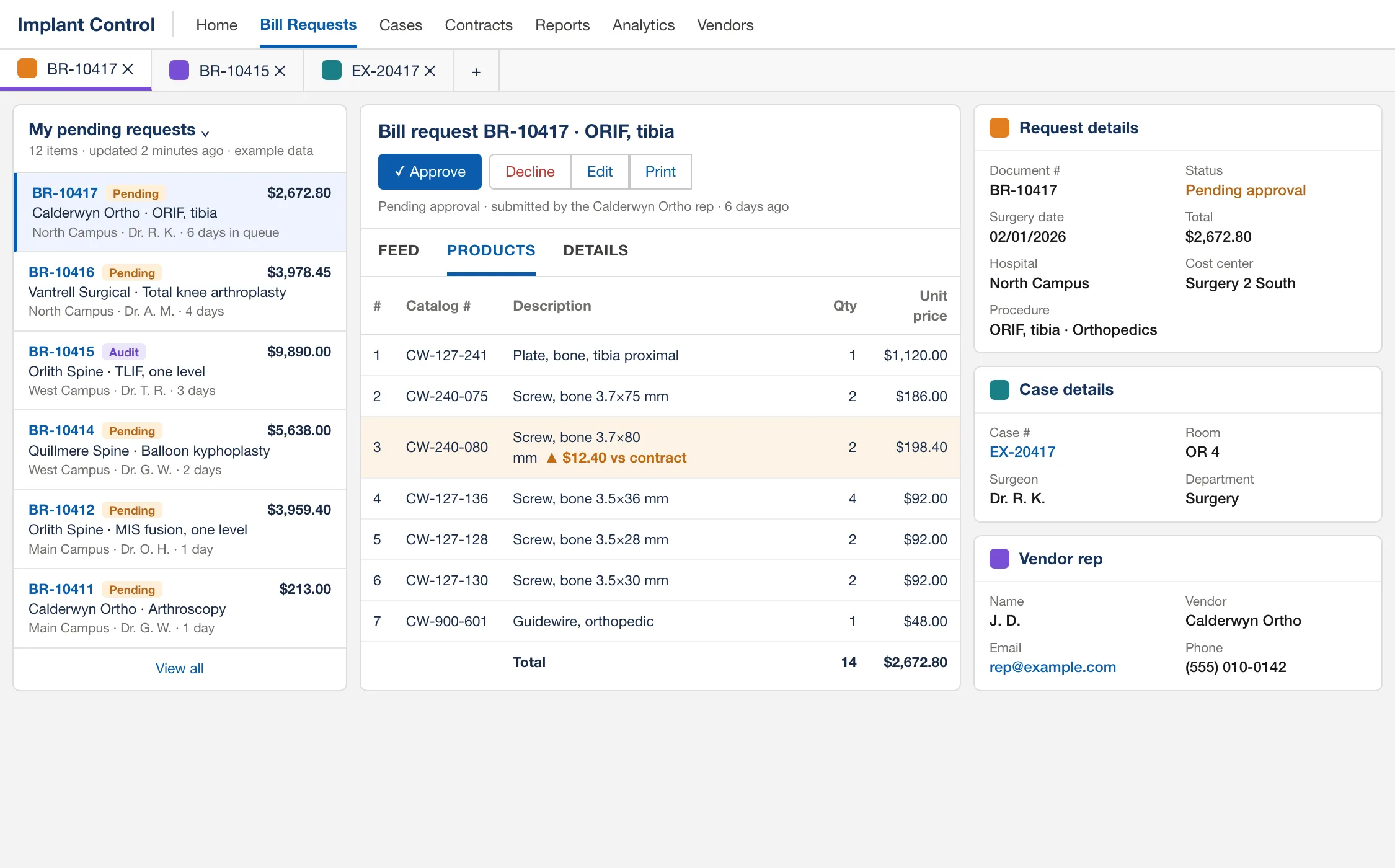
- 1The one line above contract price, flagged before anyone approves.
- 2The surgical case the request is checked against, line by line.
From the operating room to the purchase order
The operating room does nothing new: every request is checked against the case record your EMR already holds. The workflow ends when the purchase order number comes back. Invoice matching stays in your ERP.
Case data arrives from your EMR
Who acts: EMR file
Scheduled surgical case and schedule exports land by secure file transfer and load on their own, in order. An identical re-send is ignored; a changed row replaces the case snapshot.
The rep submits the request
Who acts: Vendor rep
After the case, the vendor rep signs in to a portal scoped to their own vendors and files the bill-only request against the real surgery: date, hospital, department, surgeon, procedure, case number, cost center.
Lines come from your contract
Who acts: Vendor rep
Contracted products are picked from your price list at your price, with quantity, lot and serial. Anything off contract is entered separately and flagged. Wasted, trial and explanted items are marked.
Your submission rules fire
Who acts: Automatic checks
A late request needs a written justification, a too-late request is refused, and a case number already on another active request is flagged as a duplicate.
The request is matched to the case
Who acts: Automatic checks
Catalog numbers, quantities, unit price and supplier are compared with what the surgical case record says was used, counting only quantity that no other request has already claimed.
Clean requests move, the rest explain themselves
Who acts: Approver
A clean match shows as pre-approved for the approver to confirm, or is approved automatically if you turn that on. Everything else lists exactly what differs, and the approver approves it, sends it back to the rep to correct, or declines it.
Your ERP gets the requisition
Who acts: ERP file
Approved requests leave on a schedule as a requisition file priced from the contract, and your ERP creates the purchase order. When the ERP returns the number it is matched back, the request completes, and the rep is emailed the number.
Did we implant what we were billed for?
Checking a request against a price file is half the question. The other half is whether the item was used at all. Every request is reconciled to the surgical case record, line by line.
- Catalog numbers, cleaned
- Dashes, dots, spaces and letter case are ignored, so S-2301-2852 and S23012852 are the same screw. Quantities are summed across duplicate lines on both sides before they are compared.
- The right case, found by rule
- You choose which fields identify a case: case number, medical record number with leading zeros ignored, surgery date, supplier. “Case not found” is an answer, not a silent pass.
- One implant, billed once
- A surgery often produces several requests from several vendors. Quantity claimed by one request is not available to the next, and is released automatically if that request is rejected or deleted.
- Still right after approval
- When the EMR later sends corrected case data, pending requests validate again on their own, and approved ones are flagged as changed after approval instead of being quietly rewritten.
- Evidence kept
- Every validation run records which case lines satisfied which request lines, with a readable log and history, so an approval can be defended later.
The price you negotiated is the price on the request
An overcharge caught while the request is pending goes back to the rep before any purchase order exists. The same overcharge found in an audit costs a credit, a rebill and a quarter.
- Contract price is structural
- Reps choose from the hospital’s contract catalog, so contracted items arrive at the negotiated price rather than whatever was typed. The approver sees contract price, quantity and requested amount on every line, with the difference highlighted.
- Off-contract items are visible before approval
- A non-contract line is flagged on the request and in the queue, and you decide whether a request containing one can ever be approved automatically.
- Construct pricing is applied and measured
- Apply a capitation to the lines it covers and the system bills the flat amount, shows the saving against line-item pricing, and warns in red when a capitation covers nothing or costs more than the parts it covers.
Your bill-only policy, enforced on every submission
One settings screen per organization decides how many days after surgery a request needs a written justification, when it is refused outright, how duplicate case numbers are treated, which fields identify a case, and what may never be approved automatically. The software holds the line, so reminder emails do not have to.
Who works in it
- OR supply chain coordinators and approvers
Clear the queue from one screen: preview a request beside the list, open several in tabs, see the variance and the matched case, approve, reject back to the rep, or decline.
- Contracting and value analysis
Own the price lists and construct pricing, loaded from Excel with a processing log, and see contracts that are expiring or expired but still active.
- Purchasing and accounts payable
Receive requisitions built from approved, contract-priced data instead of re-keying from an invoice.
- Perioperative leaders
See surgeries with implants used and no request submitted yet, by age, before the vendor starts chasing payment. Usage by surgeon, vendor, procedure and site.
- Audit and compliance
Mark requests audited, and answer who changed what from a change history with before and after values.
- Vendor reps and managers
One structured form, a clear status, reasons when something is sent back, and the purchase order number by email.
The guide to send your vendor repsBook a demo of the vendor rep portal
Questions buyers ask
Straight answers, including the ones that are “no”.
Does it match supplier invoices?
No. The workflow ends when the purchase order number comes back from your ERP. Invoice matching stays in your ERP or accounts payable system. What changes is that the purchase order it matches against was built from an approved, contract-priced request instead of an invoice.
How does it connect to our EMR and ERP?
By scheduled secure file exchange. Your EMR drops surgical case and schedule exports; approved requests go to your ERP as a requisition file; purchase order numbers come back in a return file. Loads are repeatable and ordered, failures send an email, and an administrator can enter a purchase order number by hand if a file never arrives. There is no real-time interface to build, which is usually why IT can approve it quickly.
Is automatic approval safe?
It is off unless you turn it on. It only ever happens at submission, never on a later re-check, only when validation finds no significant difference, and you can bar it for any request that contains an off-contract item or a duplicate case number. When a gate blocks it, the request carries a note saying which one.
What can a vendor rep see?
Only the requests they filed, for the vendors and hospitals their account is assigned to. A vendor manager sees every request for those vendors and hospitals. Who may add, edit or delete lines at each status is decided by one permission table that is enforced on the server, not just hidden in the screen.
We already use an exchange or price-sync service. Where does this fit?
Before the purchase order. A price accuracy service checks prices on orders and invoices. A bill-only purchase order is written after the case from what the rep reports, so this checks each request against the contract price list you load and against the surgical case record before your ERP creates the purchase order. Invoice matching stays where it is.
How do new approvers and reps learn it?
Inside the product. Fifteen guided tours cover the queue, working a request, cases, contracts, reports and administration. They are optional, skip steps a role cannot see, and they can be changed without a software release.
What does it not do?
It is not an inventory system: no consignment stock tracking, barcode or UDI scanning, and no native mobile app, though the web app works on a phone. Requests do not carry file attachments today. If one of those is essential for you, tell us and we will say straight out where it stands.
Then collect the rebates on it
Implant spend that is priced right and tied to a real case is exactly the spend the largest rebate contracts are written on. Rebate Recovery checks those contracts against what you bought and shows what suppliers owe you.
Further reading on bill-only and implants
Bill-only purchase orders, explained: the workflow from surgery to paid invoice
An operating manual for bill-only purchasing: the seven steps, who owns each one, where the two records of a surgery drift apart, and the controls and metrics to run it by.
Implant price variance: how to price-check a bill-only request before it becomes a PO
Where implant price errors come from, the line-level and case-level checks that catch them before the PO is written, and what to do with a variance once you find it.
Surgical case reconciliation: matching what was implanted to what was billed
What a reconciled implant case looks like, which mismatches are worth chasing, and why manufacturer device credits are a Medicare compliance issue that starts in supply chain.
Vendor reps in the OR: credentialing, access, and the bill-only handoff
How to connect vendor rep credentialing and OR check-in to the bill-only request, with a short end-of-case handoff and a one-page policy checklist.
Walk one request from submission to purchase order
Bring a month of bill-only requests, or just describe how they reach you today. We will walk one through the product: submission, the contract and case checks, approval, and the hand-off to your ERP.